
Collect by Direct Debit
Collect by Direct Debit
Section titled “Collect by Direct Debit”Direct Debit collects what is due, a set number of working days after it became due. There is no separate collection timetable to keep in step with your billing: charges fall due on the monthly bill day (or as soon as they are finalised, if you prefer), and Direct Debit follows. Members can pay by card at any time before then.
Before you start
Section titled “Before you start”- You need an admin role in the syndicate (a treasurer needs the admin role).
- The syndicate payment account must be connected and the Direct Debit capability must be active. See Payment account, Member billing and Bill members.
- Each member you want to collect from must have an active Direct Debit mandate. A member sets up a mandate from Manage Direct Debit on their syndicate’s dashboard, as described in Set up Direct Debit. Until a member has signed their mandate, there is nothing to collect against and they are skipped.
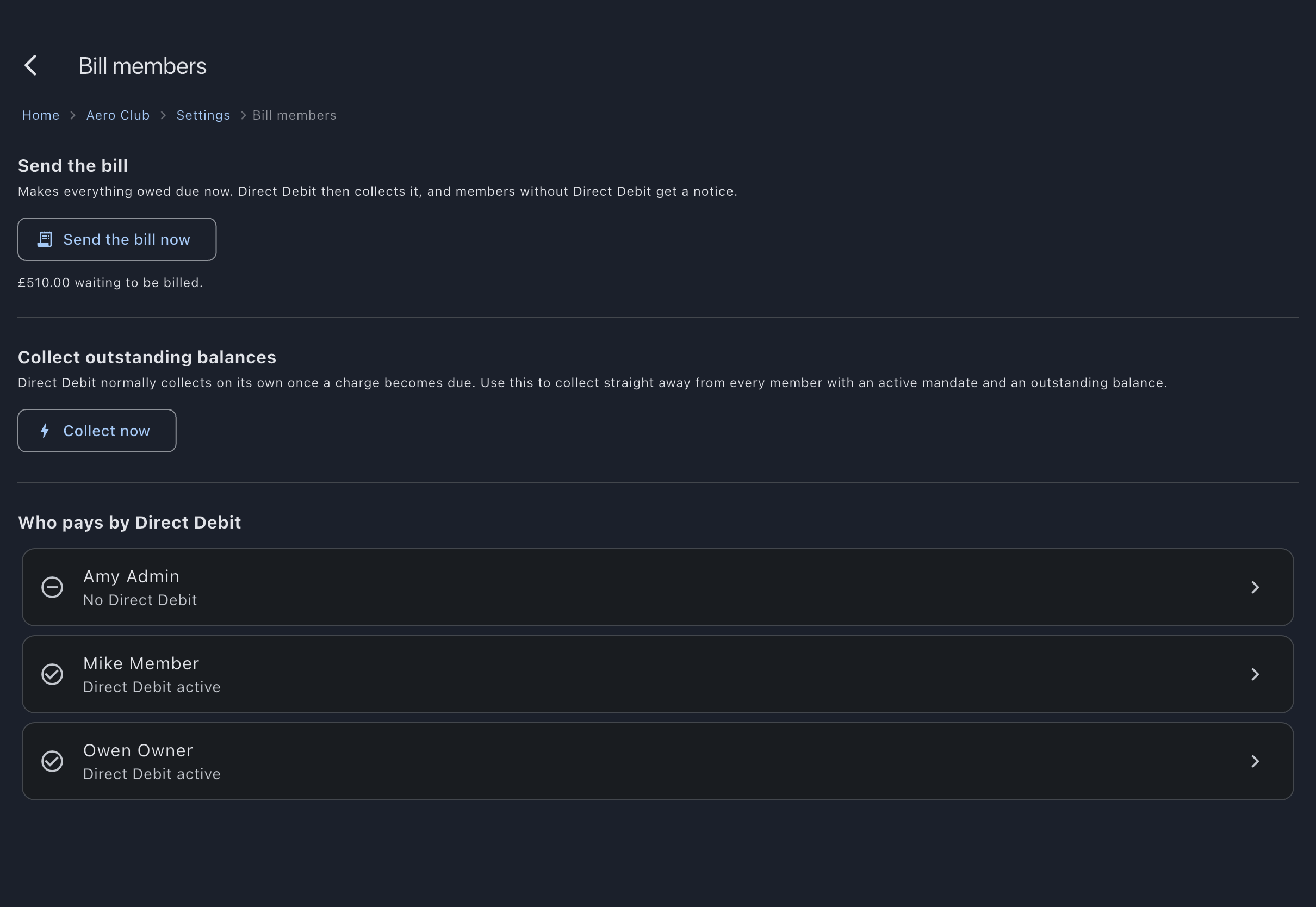
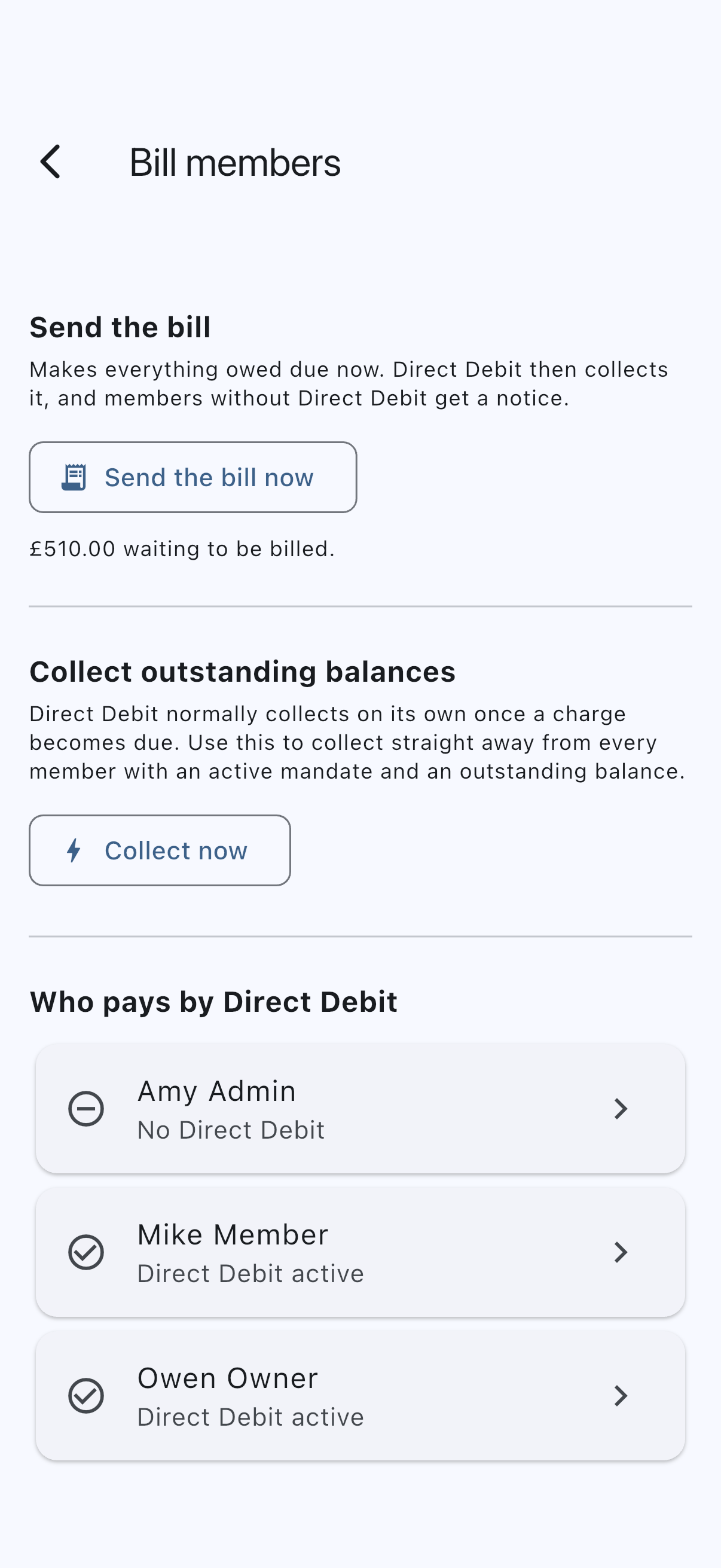
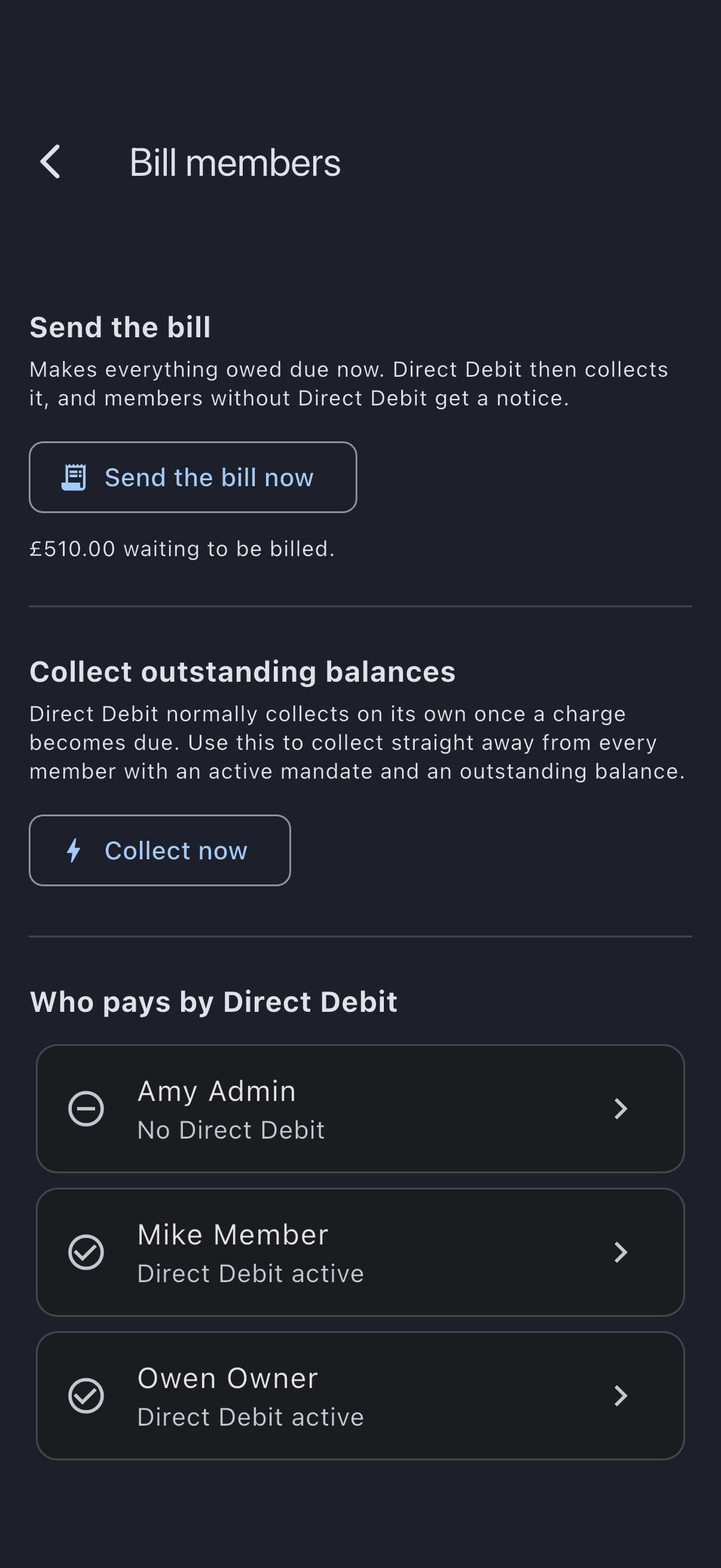
- The working-day delay is on Member billing, under Direct Debit (open the Admin tab, then tap Member billing under Money). The Collect now action and the list of who pays by Direct Debit are on Bill members (the Admin tab, then Bill members under Actions).
Prompt members to set up a mandate
Section titled “Prompt members to set up a mandate”A member must have a mandate before you can collect. Bill members has a Who pays by Direct Debit list with one row per active member: Direct Debit active, No Direct Debit (they have none), or Direct Debit cancelled (they cancelled it, or their bank rejected it). A member who has had a mandate cancelled and set up another reads as active. Tap a row to open that member’s page, then choose Prompt to set up Direct Debit. This sends them an in-app notification, a push, and an email that links straight to setup. A member who left the setup form part-way has no mandate yet, so they simply start setup again from that link.
Prompt members one at a time. Members can also set up a mandate themselves without a prompt, from Manage Direct Debit on the dashboard or the short prompt on their My Balance screen.
Set the working-day delay
Section titled “Set the working-day delay”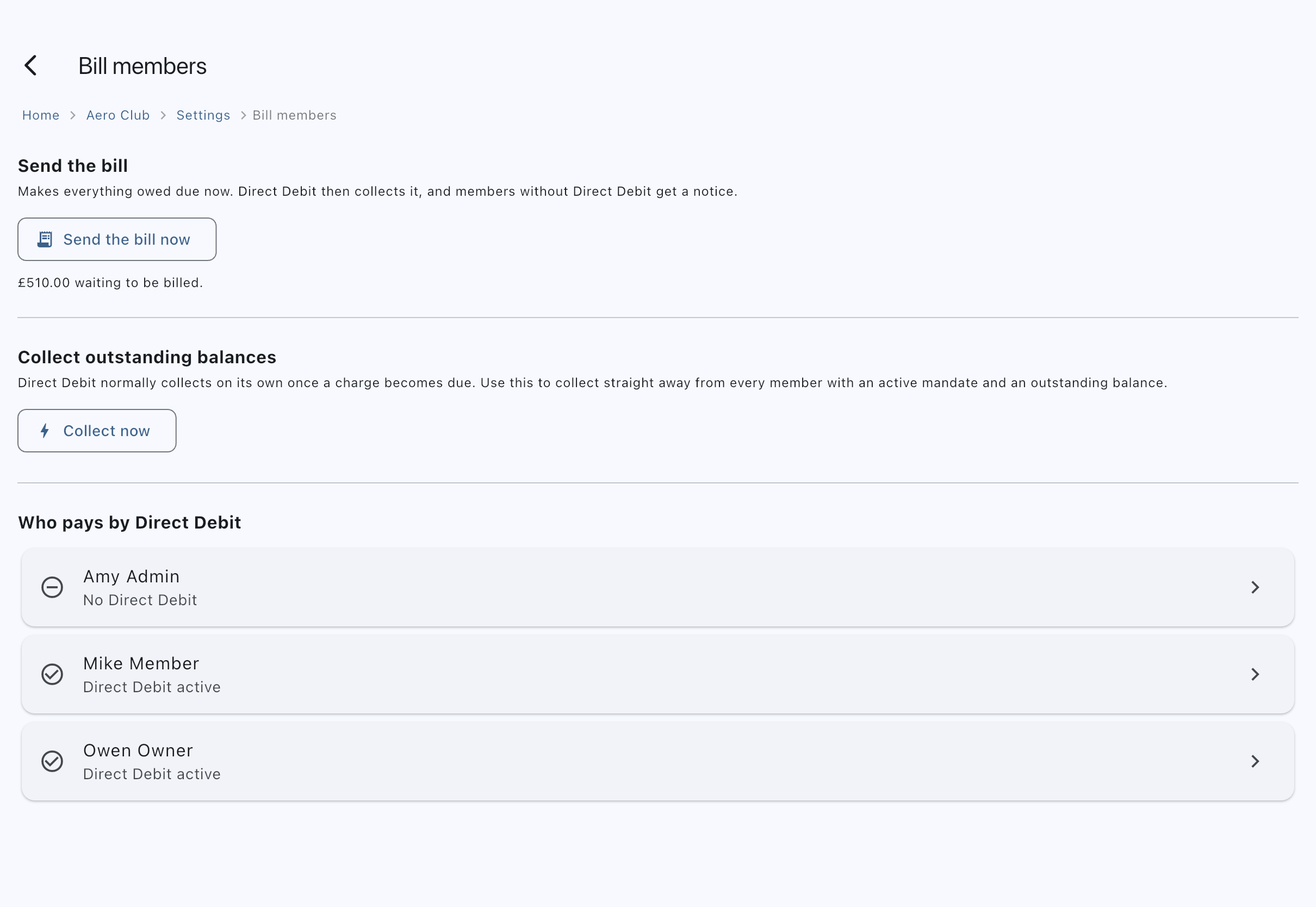
- On Member billing, under Direct Debit, choose Working days before Direct Debit collects.
- The choice saves as soon as you make it.
The delay counts working days, so weekends do not count: a charge that becomes due on a Friday with a delay of three is submitted for collection the following Wednesday morning, not Monday. Bank holidays are not modelled, so a delay that lands on one is submitted that morning like any other weekday. The day the money actually leaves the member’s account is the payment provider’s to choose, a few working days later.
The minimum is one working day, and the default is three. You cannot set it to zero: a member who has just been billed always gets at least one working day to settle by card before the money is taken from their bank account.
Members can pay by card as soon as a charge appears, so a member who pays inside the delay has nothing left to collect and Direct Debit passes them by. A member who does not is collected automatically, without an admin pressing anything.
When a charge counts as due depends on When charges become due on Member billing. See send the bill. A syndicate set to As soon as a booking is finalised has nothing to wait for: every charge is due the moment it is finalised, so the delay starts counting from then. A syndicate set to On a set day each month (the default, on the last day of the month) lets charges build up through the month, so nothing is collected until the bill is sent, automatically on the bill day or by an admin with Send the bill now, and the delay starts counting from then.
Every collection, whether automatic, Collect now, or following a bill, uses the member’s credit automatically: it takes their due charges minus any credit they can use, even credit that hasn’t been billed yet. When their credit covers everything due, no debit is taken at all: the due charges are paid from the credit, and the member gets a Credit used notice headed Paid from your credit. A cash call is never swept early, because there is nothing to sweep: a member’s share of a cash call is not on their balance until its due date (or until they pay it early), and from then on it is collected like any other due balance.
Members see the same thing on their own screen: until the due date, their share of a cash call is not in their balance figure, not in their Due list, and not in Pay All. It sits in a Cash calls not due yet card with the date on it, and a member who wants to settle early can pay it from there. If the date itself is wrong, an admin can correct it without cancelling the call: every share still waiting moves to the new date, and those members are told it has moved.
Collect now
Section titled “Collect now”Collect now is the manual override for a treasurer who wants the money moving today rather than waiting for the delay to elapse.
To inspect a collection without starting one, choose Preview collection beside Collect now. It uses the same current breakdown and has Close as its only action. An unavailable preview reports the error rather than an empty collection.
- On Bill members, under Collect outstanding balances, choose Collect now.
- Review the preview, which lists the amount due per member and puts the total in its title (Collect £81.00 by Direct Debit?).
- Check whether anyone is listed under Left out of this collection, and read why.
- Tap Collect to start the collections. The app rechecks the members and amounts before sending; if they changed, review a fresh preview first.
A member is included only if they have an active mandate and a due balance. On a syndicate billing on a set day each month, that means Collect now pulls nothing until the bill has been sent at least once; afterwards it collects whatever has become due since. When nothing is due but members with an active mandate have charges built up since the last bill, the preview says so, for example Nothing is due for collection yet. £65.00 is waiting for the month’s bill. Send the bill to make it due. The Send the bill section is directly above on the same screen. The figure is what Direct Debit would collect once billed, so it leaves out members without an active mandate.
Members left out
Section titled “Members left out”A member appears under Left out of this collection when they owe money that cannot be taken right now. The usual reason is that an earlier collection of theirs has not cleared yet: only one collection per member can be outstanding at a time, so a second would be refused in full rather than trimmed. They are listed with their balance and the reason rather than quietly dropped, because a list that just stops short reads as “nobody else owes anything”.
The total in the title, and the payments the confirmation reports as being collected, both exclude these members — so the figure you read is the figure that will be debited. After you tap Collect, the confirmation names both counts, for example “Collecting 1 payment (1 member was left out)”.
There is normally nothing to do about it. The balance stays owed and goes out on the next run once the earlier collection resolves. If you need the money sooner, take it another way and record it as an external payment against the member’s balance.
Each member receives an advance notice before the money leaves their account. Syndik8’s own “debit incoming” notice names the amount and says the money will leave over the next few working days; it does not name a day, because the payment provider decides when a collection goes and does not tell us what it chose. The provider’s advance-notice email carries the date.
Stop collecting from a member
Section titled “Stop collecting from a member”There is no syndicate-wide switch to pause collection, because collection is not on a timetable of its own: it follows charges falling due. Whether that happens on the monthly bill day or as soon as bookings are finalised is the When charges become due choice on Member billing; either way Direct Debit follows.
To stop collecting from one member, cancel their mandate. A member can cancel their own mandate from Manage Direct Debit on the dashboard at any time, and the Direct Debit Guarantee gives them that right regardless of what the syndicate does.
After a collection
Section titled “After a collection”A Direct Debit clears over a few working days, so a collection stays in progress for a short while before it succeeds. Members can follow each payment in the Payments section on their My Balance screen. A normal bank decline leaves the charges unpaid for a later run. A known permanent payment limit or method refusal releases the charges and pauses automatic collection. Members and admins are notified that admin action is required. Resolve the restriction or arrange external settlement before using Resume collection after resolving in the Collect now preview.
Very occasionally a collection request cannot be confirmed either way — it times out, say, so there is no way to know whether the bank received it. The member’s charges stay held while that is unresolved, deliberately: releasing them could mean paying twice for money already on its way. Admins are alerted, and it is sorted out by hand.
See also
Section titled “See also”- Direct Debit: what a Direct Debit is and how mandates, advance notices, and the guarantee work.
- Cash calls: the one charge a collection waits on, and what the member sees in the meantime.
- Set up Direct Debit: the member-side steps for signing a mandate.
- Payment account, Member billing and Bill members: connecting the syndicate payment account, when charges fall due, and the delay.
- Send the bill: choose when charges fall due, and send the month’s bill early.