
Enable auto-finalisation
Enable auto-finalisation
Section titled “Enable auto-finalisation”Turn on auto-finalisation so that bookings the pilot didn’t close still become charges without an admin step. Pilots normally close their own booking after their last flight, unless you’ve turned off Pilots finalise their own bookings on the same screen. Auto-finalisation is the fallback: a sweep every 30 minutes finalises a booking still open 24 hours after it ends, provided a flight is logged, the start meter lines up with the previous flight on the aircraft, no flight is logged on it twice, and there is no minimum-usage shortfall. Anything else stays in the unfinalised queue for you.
If your syndicate prefers monthly admin reconciliation, turn this toggle off and use finalise multiple bookings at once instead; that path runs the same look-back continuity check, batched and admin-triggered at month-end.
Before you start
Section titled “Before you start”- You must be an admin (a treasurer needs the admin role).
- Auto-finalisation is on by default for a new syndicate. Leave it on so flying turns into charges without an admin step even when a pilot forgets to close, or turn it off to reconcile monthly instead.
- Auto-finalisation never posts a shortfall. A booking with a minimum-usage shortfall waits in the unfinalised queue, and every admin gets a Booking Needs Attention notification to review it. A pilot who closes their own booking sees the shortfall and accepts it by closing.
- Auto-finalisation does not bypass continuity checks. A booking with a flight whose start reading or departure disagrees with the flight before it, on any leg, is skipped and stays confirmed. The pilot and all admins receive a Flight logs don’t follow on alert as soon as the flight is logged, whether or not this toggle is on; it is critical-tier and cannot be silenced in notification preferences. The half-hourly sweep also runs in every syndicate, with this toggle on or off, to send any alert that was missed and bring every standing one up to date. It only finalises bookings where this toggle is on.
- Finalising promptly accepts a known trade-off: occasionally a booking will finalise before a later flight reveals that its reading was off. The recovery is admin-driven and forward-only; see correct a finalised booking.
- Open the syndicate you want to configure.
- Tap the Admin tab.
- Tap Member billing (under Money).
- The Finalise automatically switch is in the Finalising bookings section at the top of the screen, below Pilots finalise their own bookings and above When charges become due. It sits there because it is the first gate on a charge existing without anyone pressing a button. It is not on Asset rates, and meter labels are on Admin → Usage capture.
- Tap the switch to turn it on. The change saves immediately; you see a Settings saved confirmation.
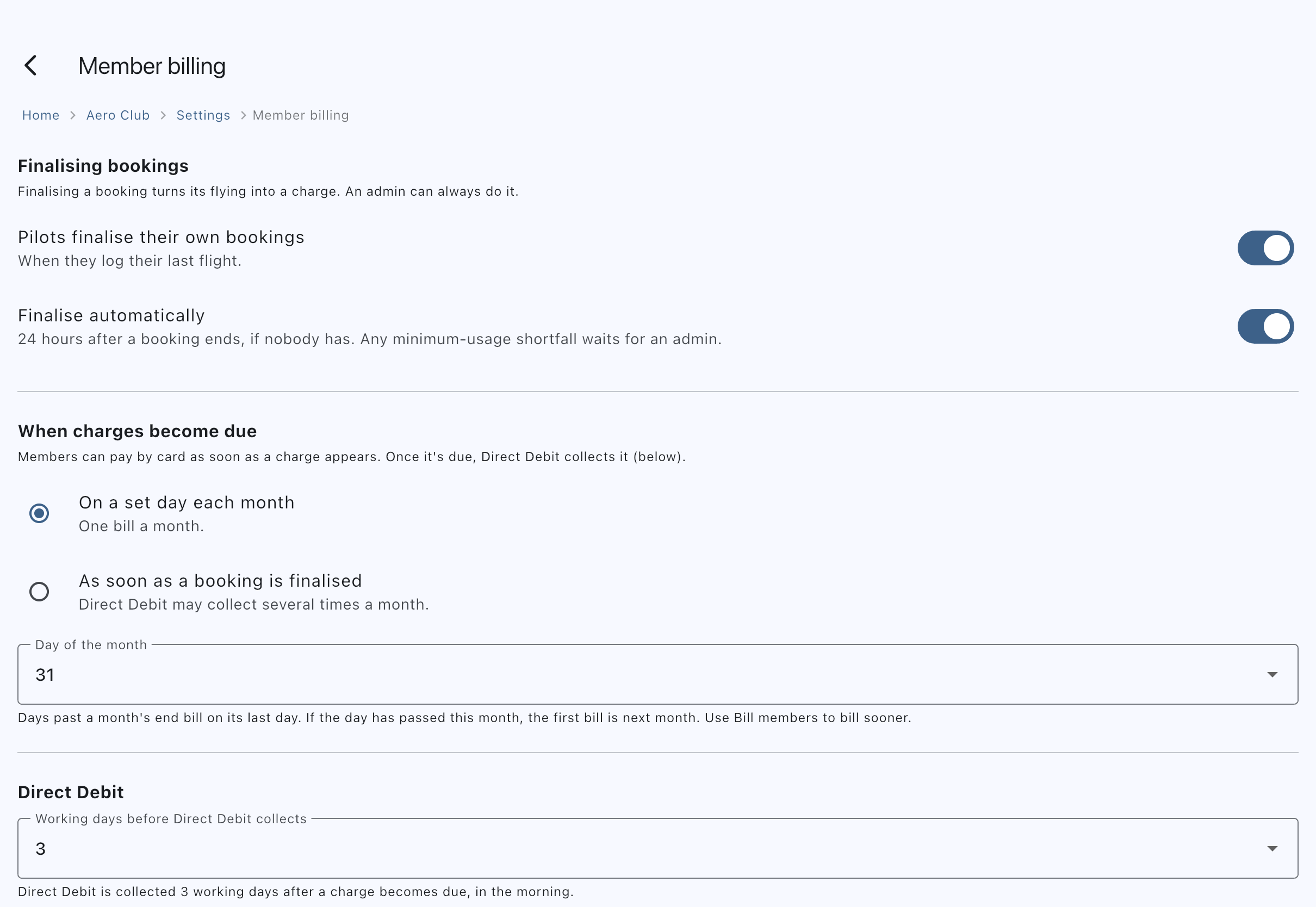
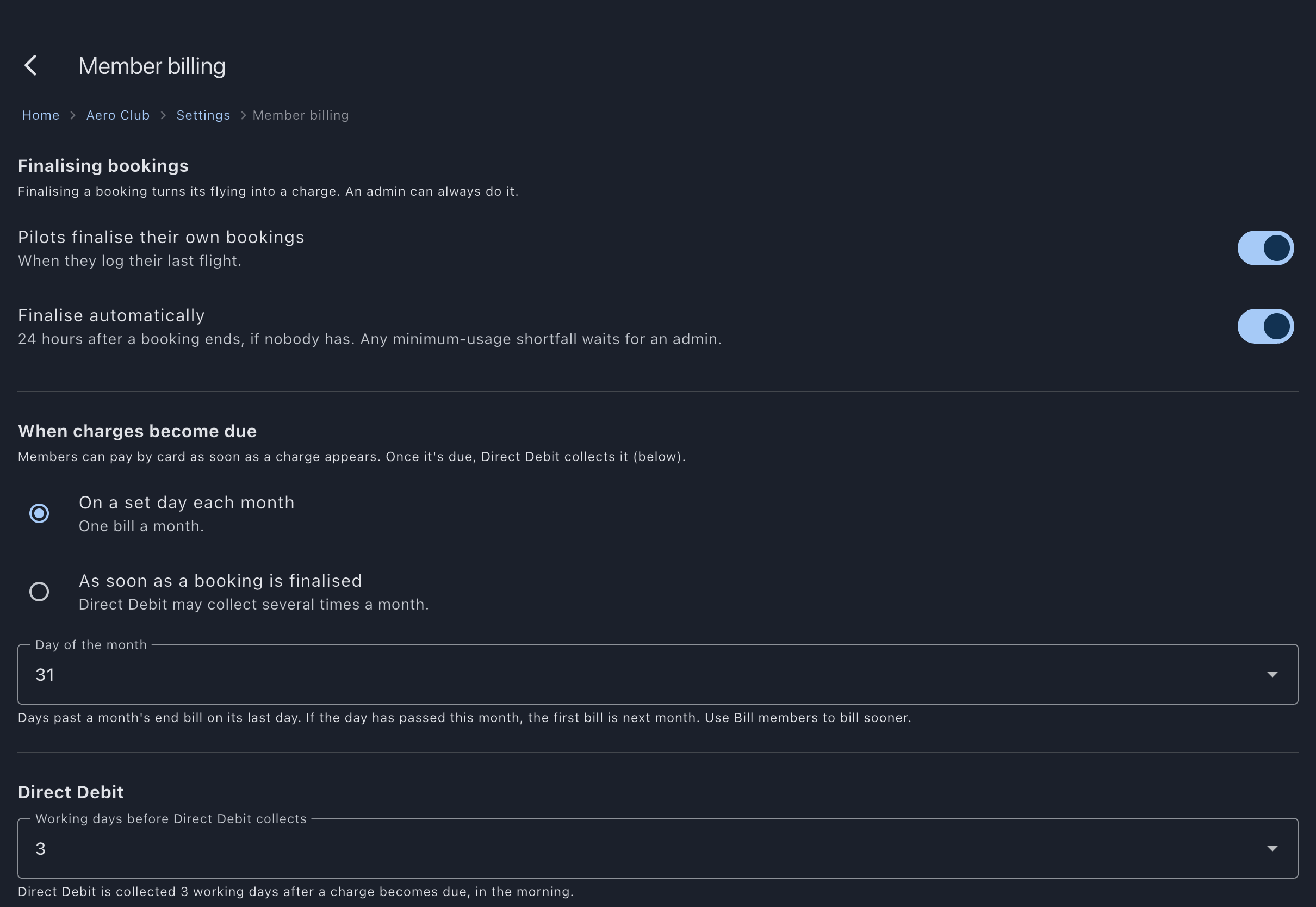
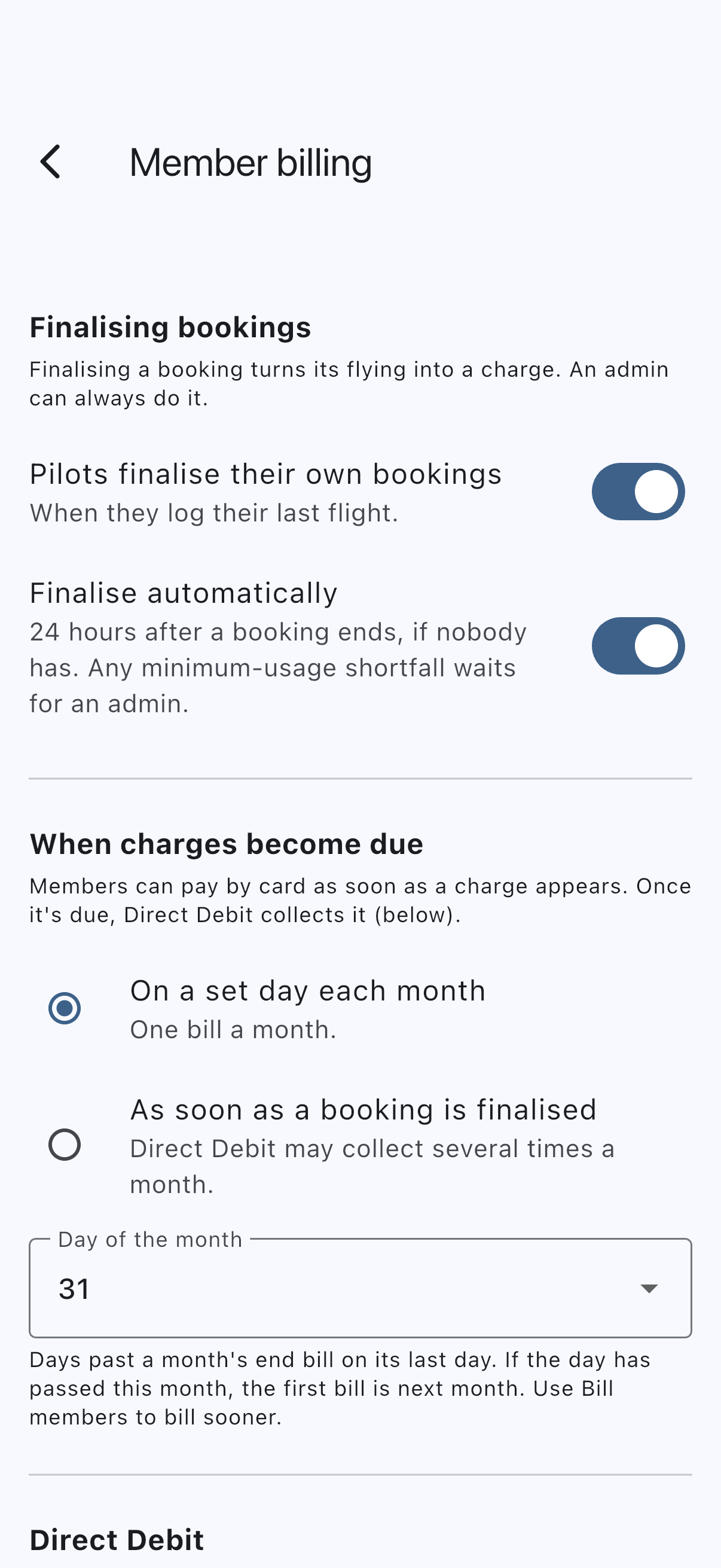
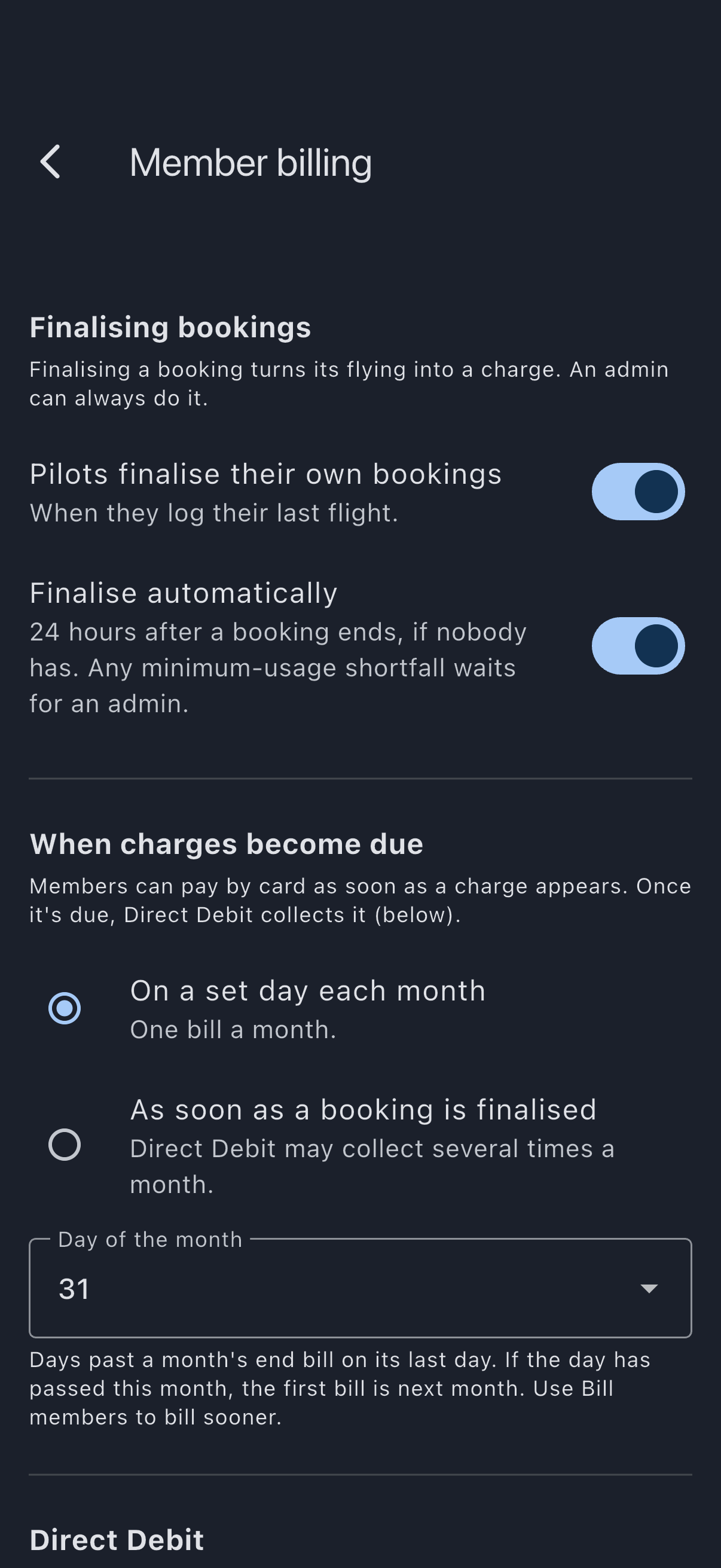
From now on, a member’s booking that is still open 24 hours after it ends is finalised by the next sweep, if a flight is logged, no flight is logged on it twice, the look-back continuity check passes and there is no shortfall. Finalised transactions appear on member balances without you opening each booking.
Saving a flight never finalises the booking. Members logging a flight in an auto-finalise syndicate see a short grey note at the top of the log form. Where members may close their own bookings it reads: “Close the booking after your last flight to make the charge payable. It will auto-close 24 hours after the booking ends.” Where only admins close bookings it reads: “This booking auto-closes 24 hours after it ends, and the charge becomes payable then.” The note is not shown when logging a ferry flight or ground run on a maintenance booking, which bills nobody.
Typical flow
Section titled “Typical flow”Here’s what happens end-to-end, with concrete numbers, on a Hobbs-metered aircraft whose syndicate sets no minimum usage.
Starting state. The previous booking on the aircraft (flown by another member yesterday) ended at Hobbs 2202.0. Auto-finalisation is on. Alex has two confirmed bookings on the same aircraft today: a morning one, 09:00 to 12:00, and an afternoon one, 14:00 to 17:00.
Morning: Alex closes the booking
Section titled “Morning: Alex closes the booking”- Alex lands at 11:00, opens the morning booking and taps Log Usage.
- Hobbs Start is pre-filled with 2202.0, read from the aircraft’s current reading (see previous-tacho pre-fill).
- Alex photographs the meter, the photo fills in 2203.5; Alex checks it, answers the defect question, and taps Log Usage. Nothing is charged yet.
- A sheet asks Is that your last flight on the aircraft? It shows Flights £270 (1.5 h × £180) and Total £270, and says the booking will end at 11:30 and the rest of the slot is released for others to book.
- Alex taps Close booking and post £270. The look-back check compares Alex’s start (2202.0) with the previous booking’s last log end (2202.0): match. The booking flips to
completed, the charge lands on Alex’s balance, and 11:30 to 12:00 is free on the calendar.
Admin POV. Nothing arrives in the unfinalised queue.
Afternoon: Alex forgets
Section titled “Afternoon: Alex forgets”- Alex logs the afternoon flight: start 2203.5, end 2205.0.
- The sheet appears, but Alex is in a hurry and taps Not yet, I’ll log more.
- From then until the sweep finalises the booking the next day, while Alex is online, a Finished with registration? card on Alex’s Home screen offers Close booking. Alex doesn’t tap it.
- At 17:00 the next day, 24 hours after the booking ended, the next sweep reaches it. The look-back check compares 2203.5 with the morning booking’s last log end (2203.5): match. There is no shortfall. The booking is finalised and Alex is sent a Booking finalised notification.
Admin POV. Still nothing to do.
What goes wrong, and what the system does about it
Section titled “What goes wrong, and what the system does about it”If Alex had typed 2203.0 instead of 2203.5 on the afternoon flight (a typo, or a missed ground run), the look-back check would find a mismatch with the morning booking’s end (2203.5). Log Flight shows “Last flight ended at 2203.5” under the start reading before Alex saves, but the log itself is still saved.
- If Alex tries to close the booking, the sheet refuses: the start reading doesn’t follow the previous flight’s end. If Alex’s log is wrong, Alex can correct it and close the booking again; otherwise an admin will review it and finalise the booking.
- Once nothing relevant has changed on the aircraft for ten minutes, the next half-hourly sweep sends Alex and the syndicate’s admins a Flight logs don’t follow on alert, normally within 10–40 minutes of the flight being logged. It names the aircraft and both readings, so the mismatch is legible without opening anything. The booking turns up in the unfinalised-bookings queue with a Meter mismatch badge, and the sweep skips it.
- Opening the flight to edit it shows “Last flight ended at 2203.5” under the start reading again. Once Alex corrects the start to 2203.5, the alert is withdrawn for everyone, the badge clears from the queue, and Alex can close the booking (or the sweep finalises it).
Otherwise, the admin opens the queue, identifies which side has the wrong reading, edits the historical log to truth using the normal usage-log editor, and either lets the next sweep pick the booking up or finalises manually using finalise a booking.
A shortfall
Section titled “A shortfall”If the syndicate sets a minimum usage and a booking comes in under it, the close sheet shows a Minimum-usage shortfall line. A pilot who closes accepts it. If the pilot leaves the booking open, the sweep never finalises it: it waits in the unfinalised queue and every admin gets a Booking Needs Attention notification (“A booking on aircraft has a minimum-usage shortfall of £X, so it was not finalised automatically. Open it to review the shortfall and finalise it.”). Open it, and post or waive the shortfall from the Finalise Booking section.
Out-of-order arrivals
Section titled “Out-of-order arrivals”Members do not always log in flight order. If pilot B logs straight away but pilot A (whose flight came first on the same aircraft) logs later, B’s close is refused until A’s flight is logged, and the sweep waits on B’s booking without notifying anyone. Once A logs, B can close, or a later sweep reconciles it (or you finalise it by hand).
The boundary this enforces: clean data finalises without you, dirty data lands in front of an admin, a shortfall always gets a person’s judgement, and out-of-order data waits without surprising anyone.
To turn auto-finalisation off
Section titled “To turn auto-finalisation off”Repeat the steps above and toggle Finalise automatically off. Existing finalised bookings stay finalised; auto-finalisation does not reverse its past work. Members can still close their own bookings if Pilots finalise their own bookings is on; anything they leave open waits in the unfinalised queue for you. With both switches off, you finalise every member booking. If charges fall due on a set day each month, the same screen warns you that unfinalised bookings will not be billed.
If it goes wrong
Section titled “If it goes wrong”- A booking stayed confirmed with a Meter mismatch badge. The look-back continuity check detected a meter mismatch with the flight before one of its flights: the previous flight on the aircraft, or an earlier leg of the same booking. The pilot and all admins got a Flight logs don’t follow on alert. Open the booking, identify which log is wrong (this one or the one before it), edit the historical log to truth, and finalise manually using finalise a booking or wait for the next sweep.
- A booking stayed confirmed with a Missing previous log badge. No conflict: an earlier booking on the aircraft has ended with no log, and this booking’s start reading, or its first departure, does not follow on from the last logged flight. That unlogged flight may explain it, so no alert is sent. The booking reconciles once that flight is logged. If no log is expected, finalise it by hand.
- A booking stayed confirmed with a Departure mismatch badge. One of its flights left from somewhere other than where the aircraft last landed, and the pilot and every admin got a Flight logs don’t follow on alert. Check both routes, correct the wrong one, and wait for the next sweep, or finalise it by hand; see Departure conflict.
- A booking with a shortfall wasn’t finalised. By design: a shortfall is never posted automatically. You were sent a Booking Needs Attention notification. Finalise it by hand, waiving the shortfall if that’s fair.
- A booking with one flight logged twice wasn’t finalised. Two of its logs cover some of the same time, or have the same start and end readings, as though one flight was logged twice (on the Apple Watch and again on the phone, say). Both would be charged, so the sweep leaves it for you, and every admin got a Booking Needs Attention notification. Open the booking, remove the spare log from the Finalise Booking section, then finalise it; see two logs of one flight.
- A booking ended hours ago and is still in the queue. The sweep waits 24 hours after a booking ends, so the pilot can log remaining flights and close it themselves. Leave it, or finalise it now. Until then it sits under Waiting to be closed on the unfinalised queue and is not counted on the Pending page.
- A member logged a flight offline. Nothing finalises on the spot or when the log syncs. Back online, the member can close the booking from the booking or the Home screen; otherwise the sweep picks it up 24 hours after the booking ends, on the usual conditions.
- A flight arrived after the booking was finalised. It came from the End Flight card, the Apple Watch or a device that was offline. It is kept but not billed, and every admin got a Booking Needs Attention notification. Open the booking (it is also listed under Needs attention on the Pending page) and use Apply the new charge to add it to the charge; see correct a finalised booking.
- The switch is greyed out or missing. You are not an admin on this syndicate. Auto-finalisation is an admin-only toggle.
- A maintenance booking closed itself, and I have this toggle switched off. That is deliberate, and it is the one thing this toggle does not control. Flying to the engineer is met through the monthlies rather than billed per flight, so closing a maintenance booking charges nobody. The toggle decides whether a member’s flying becomes a charge without anyone’s say-so; with no charge in play there is nothing for it to decide, and the alternative is a queue row whose only available action is to close it. Maintenance bookings therefore close on the first finalisation sweep after their end time in every syndicate. Note that this is a sweep, not an instant: saving hours against a maintenance booking does not close it there and then.
- A finalised booking later turned out to have been wrong. The recovery path is correct a finalised booking: correct the flight, then apply the difference. Do not try to “unfinalise” the booking.
See also
Section titled “See also”- Auto-finalisation: reference page with the full behaviour rules
- Close a booking: the pilot’s route, which comes first
- Tacho-continuity conflict: what makes auto-finalisation skip a booking
- Finalisation rules: what the automatic flow writes to the ledger
- Finalise a booking: manual alternative for skipped cases and shortfalls
- Finalise multiple bookings at once: the bulk path used when this toggle is off, running the same look-back check
- Correct a finalised booking: recovery when a finalised booking turns out to have been wrong
- Notification types: including the Flight logs don’t follow on and Booking Needs Attention notifications