
Finalise multiple bookings at once
Finalise multiple bookings at once
Section titled “Finalise multiple bookings at once”When the unfinalised queue is large and most bookings are clean, bulk-finalise in one action instead of opening each booking. Bulk uses the same continuity check as auto-finalisation: every flight’s start is compared to the flight before it on the same asset (the previous booking’s last flight for a booking’s first leg, the leg before for each later one), so a booking whose reading disagrees stays out of the batch until you investigate.
This is the path syndicates that turn auto-finalisation off use to reconcile at month-end, and the way to clear whatever pilots and the sweep leave behind in any syndicate. Pilots closing their own bookings and the sweep cover the prompt cases; this page covers the prudent one. All of them ask the same question — does this flight line up with the one before it?
Before you start
Section titled “Before you start”- You must be an admin.
- Bookings with a shortfall are flagged with a Shortfall badge in the list; finalising them here applies the calculated shortfall charge as-is. To waive the shortfall, finalise that booking individually first.
- You must be online. The bulk buttons (Finalise No-Shortfall and Finalise All) write to the financial ledger and disable when the device is offline. Finalise No-Shortfall only appears when at least one eligible booking has no shortfall.
- Neither button writes on the tap. Both open a confirmation dialog first, and nothing reaches the ledger until you confirm it. Both dialogs say “Finalising posts charges to the ledger and cannot be undone.”
- Unfinalised bookings must be on a single asset. When the queue spans more than one asset, the bulk bar is replaced by an info note; finalise each booking individually in that case.
How the checks classify each row
Section titled “How the checks classify each row”Before the batch runs, each booking in the queue is checked on the server: its first log’s start value against the last actually-flown reading before it on the same asset, each later log’s start against the end of the log before it, and each flight’s departure against where the aircraft last landed. A row whose checks all pass shows no badge. Otherwise the row shows its most important finding as a badge, with +N more when there are others. Open the booking to see every finding under Needs attention, with the recorded values and what to do next.
The findings, highest priority first:
| Badge | What it means | Goes into “Finalise All”? |
|---|---|---|
| (no badge) | Every check passes. | Yes |
| No member | The booking has no member on it, so there is nobody to charge. | No |
| Possible duplicate | Two logs on the booking cover some of the same time, or have the same start and end readings, as though one flight was logged twice, so both would be charged. | No |
| Meter mismatch | A start meter disagrees with the end of the flight before it beyond tolerance (0.01 h): the previous booking’s, an earlier leg of the same booking, or the opening reading on the first flight on the asset. Booking detail reads, for example, “Starts at 1234.5; the previous end or opening reading is 1234.2.” | No |
| Departure mismatch | A flight on the booking left from somewhere other than where the aircraft last landed: before the booking for its first flight, or at the end of the leg before for a later one. Maintenance bookings are never held for this. Booking detail reads, for example, “Leaves from EGMC; the previous landing is EGKB.” | No |
| Missing previous log | An earlier booking with no log at all lies between this booking and the last logged flight, and either the meter has moved beyond the last logged end or this booking’s first flight leaves from somewhere other than the last landing. The unlogged flight may explain the difference, so the booking waits for it. | No |
| Earlier logs unclear | The earlier booking has logs that may describe the same flight, so there is no single reading to compare with yet. | No |
| No baseline reading | There is no earlier or opening reading to compare the start with. | No |
| Check failed | The check could not finish. | No |
| No flight logged | Nobody logged a flight on the booking. | No |
| Shortfall | Usage came in below the configured minimum, so a shortfall charge applies. | Yes, with the shortfall charge. Finalise No-Shortfall leaves it out. |
The most-recent flight on an asset can finalise as soon as its look-back checks pass. It never waits for a future flight. Empty bookings in between are passed over when its start matches the latest genuine end reading, or the opening reading with no earlier logged usage, and its first departure matches the last genuine landing. A higher start reading, or a different first departure, across an empty booking shows Missing previous log instead; for the route, an empty maintenance booking is passed over. Those empty bookings are not marked as no-shows or finalised by this inference. An opening-reading mismatch is a conflict when there is no earlier eligible booking. “Finalise All” therefore clears the whole clean queue without a separate “trailing flight” exclusion.
Maintenance bookings in the queue are finalised as maintenance. The queue holds them alongside members’ flights — the trip to the engineer is unfinalised work like anything else — and the bulk action treats each booking the way opening it would: a member’s flight is charged to that member, and a maintenance booking closes with nobody charged. Flying the aircraft to the engineer is a cost of owning it, already met through the monthlies, so there is no separate charge to raise; the flight itself still counts, since its hours had already moved the meter and joined the technical log when the usage log was saved. You do not need to pull maintenance out and do it separately.
In practice you will rarely see one here. Because a maintenance booking charges nobody, the finalisation sweep closes it on the first pass after its end time in every syndicate, whatever the auto-finalise setting — so by the time you open this screen the maintenance rows have usually gone already. The ones that remain are the ones the continuity check held back, where a ferry flight’s start reading disagrees with the flight before it.
The badges update live as members submit logs. If a Missing previous log row’s earlier pilot files their log while you are looking at the queue, the row reclassifies in place to reflect the new verdict, without you needing to refresh.
When every row in the queue is excluded, the Finalise All button shows greyed out as Finalise All (0) rather than disappearing, so the action stays discoverable and the count makes it obvious why nothing happens if you tap it.
- Open the syndicate.
- Go to the Admin tab and tap Pending (or tap the pending-actions icon at the top of the syndicate screen), then tap Review on the Finalisation section. Unfinalised Bookings opens.
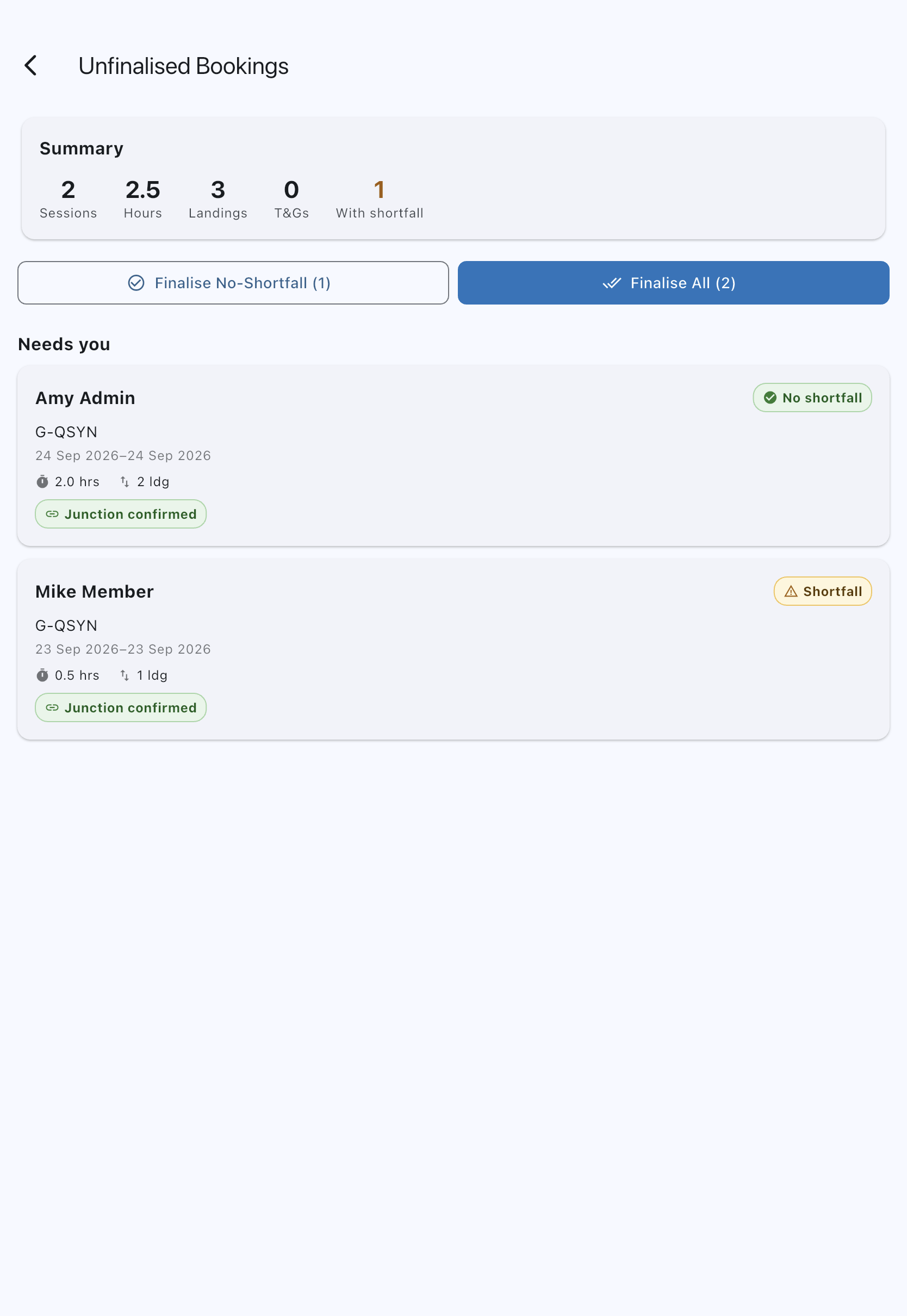
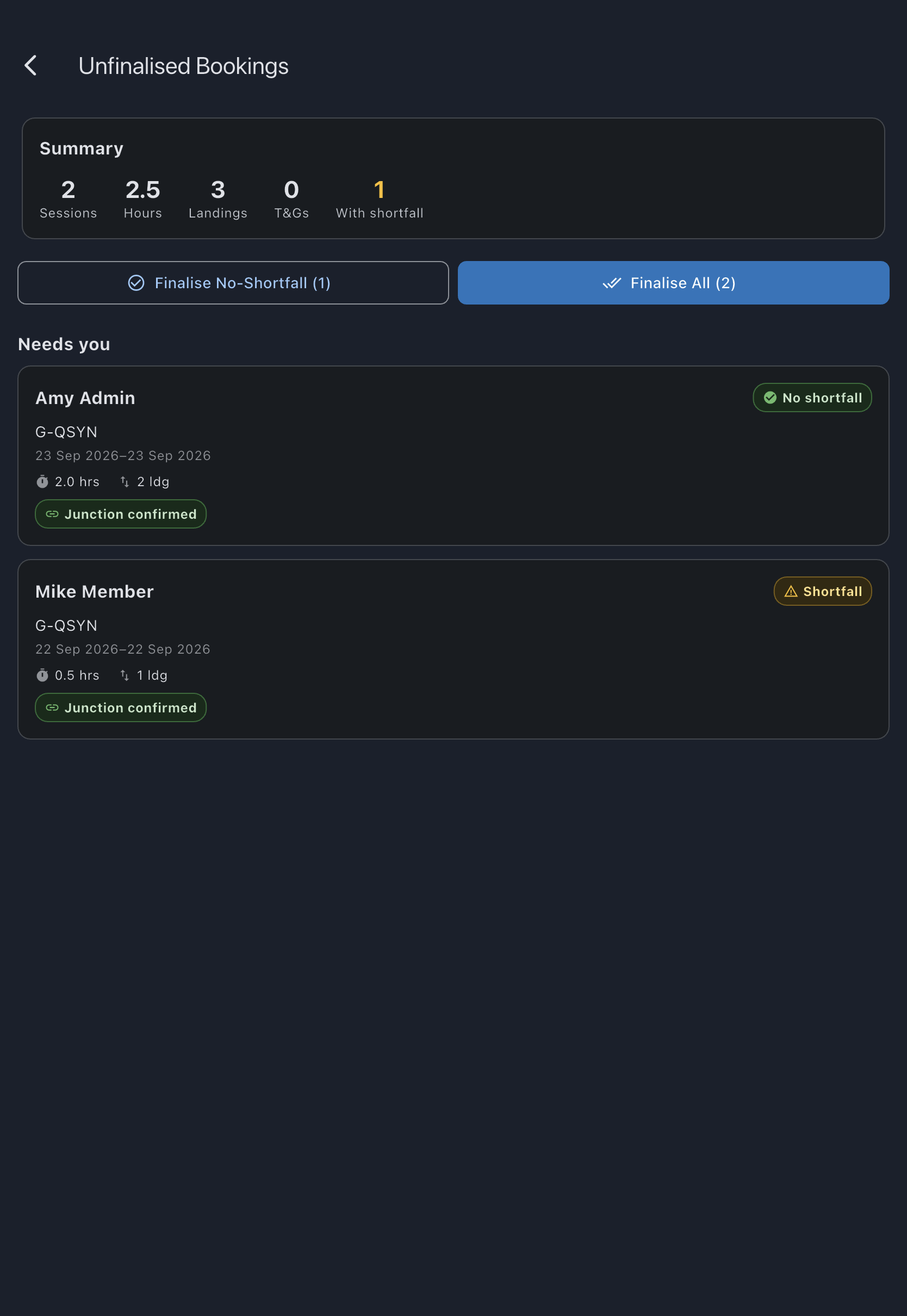
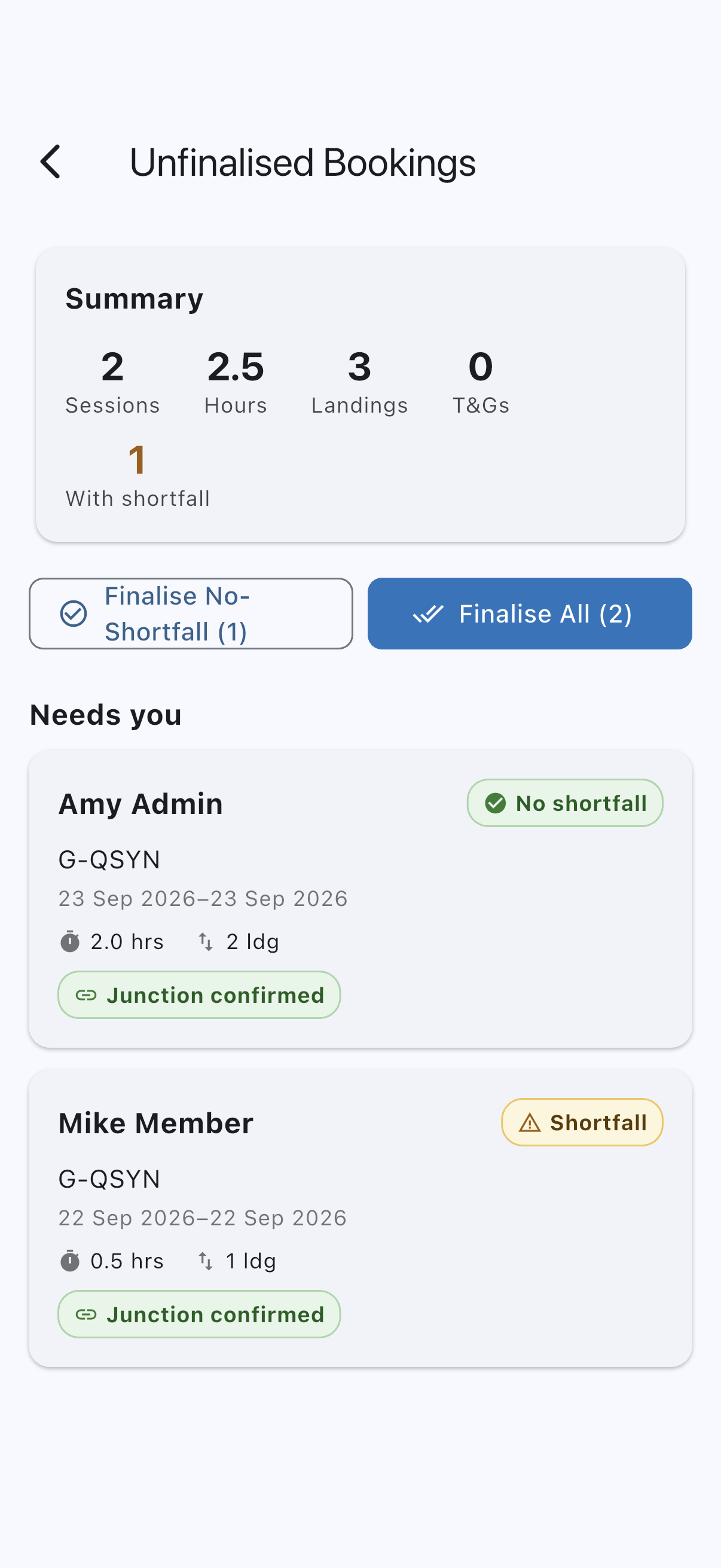
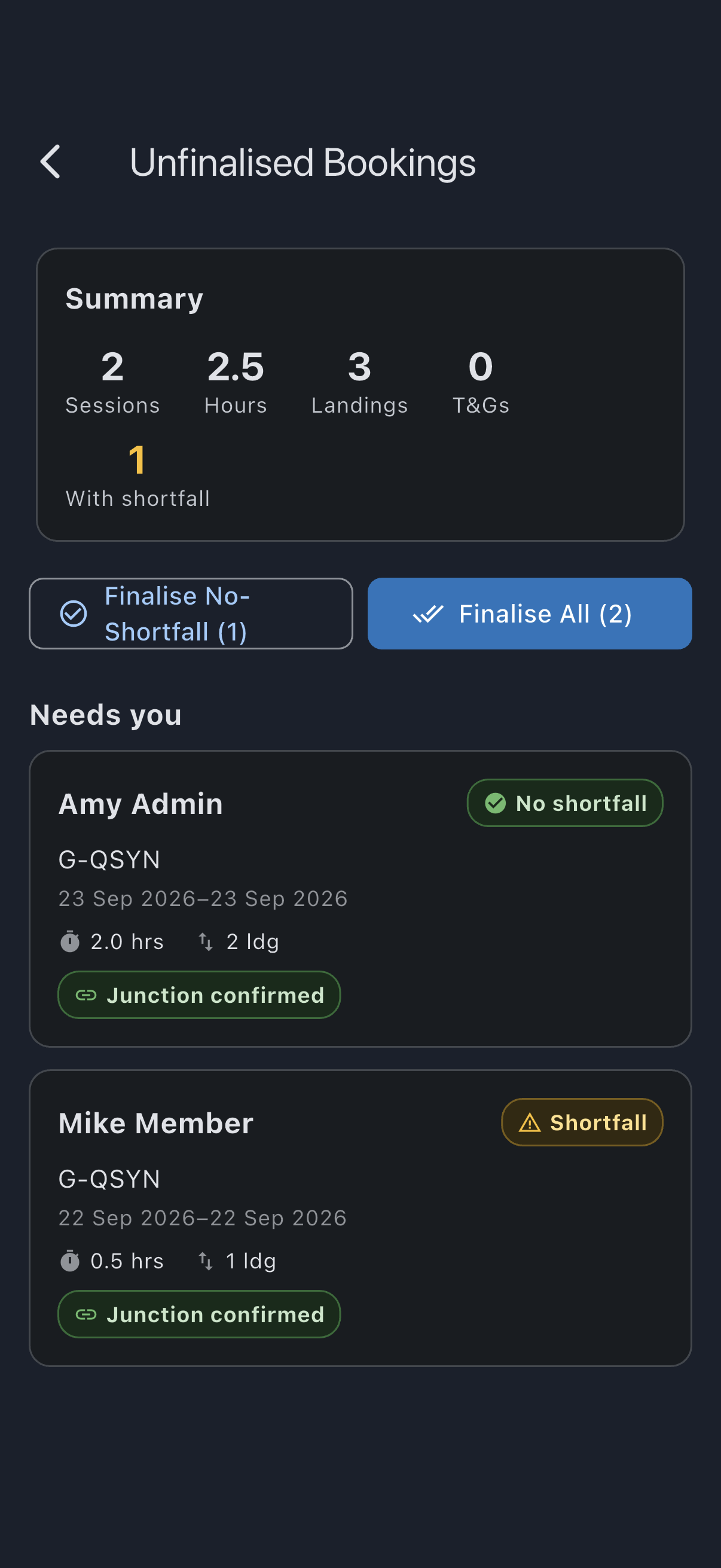
- Review the summary header: Sessions, Hours, Landings, T&Gs, and With shortfall counts.
- Note the two groups. Needs you holds the bookings nothing else will finalise now; Waiting to be closed holds the ones that ended less than 24 hours ago, which their pilot or auto-finalisation can still close. Both bulk buttons cover both groups, so a bulk run also finalises bookings their pilots could still have closed themselves.
- Scan the badges. A row with no badge, or with only Shortfall, goes into the batch. Any other badge needs separate attention before the booking can finalise.
- Choose a bulk action:
- Finalise No-Shortfall (N): finalises only rows with no badge. Skips anything with a finding, including a non-zero shortfall.
- Finalise All (N): finalises every row with no badge or only Shortfall, applying the calculated shortfall where it exists. Excluded rows stay queued.
- Confirm. Whichever button you tapped, a dialog appears before anything is written:
- Finalise No-Shortfall opens Confirm Finalisation, which names how many bookings are about to be finalised and warns that finalising posts charges to the ledger and cannot be undone. Tap Finalise to commit.
- Finalise All opens Confirm Bulk Finalisation, which repeats the counts, says how many of the bookings will have shortfall charges applied, and carries the same warning that finalising posts charges to the ledger and cannot be undone. Tap Finalise all to commit.
- Cancel on either dialog leaves the queue exactly as it was; nothing has been posted at that point.
You see N bookings finalised, and the finalised bookings drop off the queue. A batch is all or nothing: if any booking in it cannot be finalised, nothing in the batch is, you are told why, and the queue stays as it was.
Resolving the excluded rows
Section titled “Resolving the excluded rows”Meter mismatch
Section titled “Meter mismatch”A flight’s start reading disagrees with the end reading of the flight before it on the same asset, above it or below it. Two legs of one booking whose readings only partly overlap land here too: they are two flights, and the later one does not start where the earlier one ended. When that flight is on an earlier booking, open this booking and tap View linked booking under the finding in Needs attention to jump to it; when it is an earlier leg of the same booking, or the aircraft’s opening reading on its very first flight, there is no link. Work out which side has the wrong reading (sometimes by talking to the pilots), edit the historical log to truth using the normal usage-log editor, and re-run bulk; the badge clears once the values agree. If the previous flight has already been finalised, correcting it goes through correct a finalised booking instead, which fixes the flight and then lets you apply the difference as an adjustment rather than editing a locked charge. If you would rather not wait, finalise this booking individually with finalise a booking, since the manual path bypasses the continuity check.
Departure mismatch
Section titled “Departure mismatch”A flight on this booking left from an airfield other than the one the aircraft last landed at. The arrival decides landing fees, so one of the two routes needs checking before anything is billed. When the flight it disagrees with is on an earlier booking, open this booking and tap View linked booking under the finding to open it; when it is an earlier leg of the same booking, there is no link. Work out which route is wrong, and correct it in the normal usage-log editor; the row then joins the next batch. If the routes really are right (a flight in between that was never booked, say), finalise the booking individually with finalise a booking, which does not check the departure. See Departure conflict.
Both checks, the meter and the departure, are made again when you confirm the batch. If a log changed after the queue loaded and a booking no longer follows on, the whole batch is refused and nothing is finalised. Refresh the queue: that booking then shows its finding and drops out. Finalise the rest again.
Missing previous log
Section titled “Missing previous log”An earlier booking on the aircraft has ended with no log at all, and this booking’s start reading is higher than the last logged end, or its first flight leaves from somewhere other than the last landing. That unlogged booking may be the flight that explains the difference. Missing usage alone does not tell Syndik8 whether a booking was unused or its pilot still has flights to upload. There is no timeout that turns this into a meter or route alert, and no alert is sent while it waits. If a log is expected, wait for it: once the missing flight is logged, the readings and routes are compared as usual. If no log is expected or you need the booking finalised now, review the history and finalise it individually. The manual path bypasses the continuity check, on admin trust.
Earlier logs unclear or No baseline reading
Section titled “Earlier logs unclear or No baseline reading”Earlier logs unclear means the booking before has logs that may describe the same flight: open that booking and remove the spare log, and the readings can be compared. No baseline reading means there is nothing earlier to compare with: review the aircraft’s opening reading and the earlier bookings. Either can also be finalised individually once you have looked.
No member
Section titled “No member”The booking has no member on it. That happens when the person who booked it has since deleted their account: their bookings are emptied of an owner and otherwise left where they are.
Unlike the meter and route findings, this one is not a matter of admin trust and the individual path will not override it. Every charge finalisation raises goes on somebody’s balance, and there is nobody here to put it on; it would also be priced at the syndicate’s base rate rather than the member’s, because the rate comes from whose booking it is.
Assign the booking to a member and it finalises normally.
Possible duplicate
Section titled “Possible duplicate”Two of the booking’s logs cover some of the same time, or have the same start and end readings, usually one flight logged on both the Apple Watch and the phone. Bulk finalisation prices bookings without showing you their logs, so it leaves this one out rather than charge the flight twice. Open the booking: its Finalise Booking section names the overlap and offers a Remove flight N button for each overlapping log (see Two logs of one flight). Once the spare log is removed, the booking can go into the next batch. If the two really were separate flights, finalise the booking individually from the same screen.
The server checks as well. If your device has not yet synced one of the two logs, the booking can still go into the batch, and the server then refuses the whole batch rather than charge the flight twice (see If it goes wrong below).
Check failed
Section titled “Check failed”The check could not finish for this booking, so it is left out rather than assumed clean. Close and reopen the queue to run the checks again before using bulk finalisation.
No flight logged
Section titled “No flight logged”Nobody logged a flight on the booking. Open it to log the flight, or review whether to cancel the booking.
Offline behaviour
Section titled “Offline behaviour”The bulk Finalise No-Shortfall and Finalise All buttons watch connectivity, the same way single-booking finalisation does. When the device is offline both buttons disable and show Settlements need a connection. Try again when you’re online if you tap them. They re-enable automatically when the connection returns. Bulk finalisation cannot be queued; the underlying RPC writes to the financial ledger atomically per booking, and queueing it offline would risk a partial or double settlement.
If it goes wrong
Section titled “If it goes wrong”- Some bookings remain in the queue after a bulk action. Check the badge on each one. Any badge other than Shortfall is a deliberate exclusion; the checks are doing their job. Resolve them per the section above.
- “Nothing was finalised: one booking has a flight logged twice. Find it marked Possible duplicate in the list, remove the extra log, then try again.” One flight was logged twice, and your device had not yet synced the second log, so the queue could not leave that booking out. The server refused the whole batch, so nothing was charged. Once the device has synced, the booking shows Possible duplicate and drops out of the batch; run the batch again, and deal with that booking as described under Possible duplicate.
- “Nothing was finalised: one booking’s flight no longer follows on from the one before. Find it marked Meter mismatch or Departure mismatch in the list, then try again.” A reading or route changed after the queue loaded. Nothing was finalised. Refresh the queue: the booking now shows its finding, Meter mismatch or Departure mismatch, and drops out of the batch. Open it, check its readings and route, then finalise it. See Meter mismatch and Departure mismatch.
- “Nothing was finalised: one booking is waiting for an earlier flight to be logged. Find it marked Missing previous log in the list, then try again.” Your device and the server disagreed about whether an earlier flight had been logged, so the queue did not leave that booking out. Nothing was finalised. Once the device has synced, the booking shows Missing previous log and drops out of the batch; run the batch again. See Missing previous log.
- “Nothing was finalised: one booking has no flight logged. Find it marked No flight logged in the list, then try again.” One booking in the batch had no flight logged by the time the server checked it, so nothing was finalised. Once the device has synced, the booking shows No flight logged and drops out of the batch; run the batch again. See No flight logged.
- “Finalise All (0)” is greyed out. Every row in the queue is excluded by a finding. Either resolve the findings (or wait for the earlier logs) so the badges clear, or finalise individual bookings using finalise a booking.
- The bulk buttons are disabled. Either there are no eligible bookings (the no-shortfall count is zero, or the queue is empty), or the device is offline. See Offline behaviour above.
- “All bookings finalised” empty state: the queue is clear; nothing to do.
- A bulk-finalised booking later turned out to have been wrong (typically the most-recent flight, whose end reading only gets a continuity check once the next flight happens). Use correct a finalised booking to correct the flight, then review and apply the new charge.
See also
Section titled “See also”- Finalisation rules: what bulk finalisation actually does per booking, and how each path handles a junction
- Tacho-continuity conflict: the meter-junction concept the continuity check enforces
- Unfinalised bookings queue: the admin view
- Finalise a booking: per-booking version with a shortfall waive option and continuity-bypass on admin trust
- Enable auto-finalisation: the fallback that finalises clean bookings the pilot left open, using the same continuity check
- Correct a finalised booking: recovery when a finalised booking later turns out to have been wrong